Changing Translation on Closed Captions in Service Training Videos
When you click on one of the service videos in our collection, here are the steps you take to make the closed captioning in your own language:
1. OPEN VIDEO THROUGH LINK. When opening the video on the Service Hub Page, it does not start automatically start. Click the video twice, so the bar at the bottom appears and it pauses the video until you can choose your language.
2. TURN ON CLOSED CAPTIONING In that bottom bar click the CC button, it will turn on and go solid white
It will turn on and go solid white
3. CLICK ON COG WHEEL In that bottom bar there is a cog wheel (Settings) Click it and a box will appear
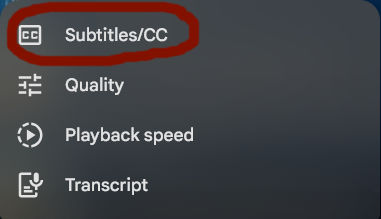
4. SELECT SUBTITLES/CC In the box that appears, click the top choice, Subtitles/cc
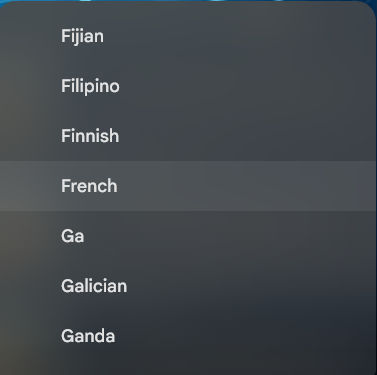
5. CHOOSE LANGUAGE In the box that appears, click what language you want
YOU NOW CAN WATCH THE VIDEO IN THE CLOSED CAPTION OF THE LANGUAGE YOU CHOOSE